FeaturesAccount Management

Get Complete Control with Zero Complexity

Account Management

Twozo’s Admin Settings give you a single, organized hub to configure every dimension of your CRM, from who accesses what, to how your team communicates and sells.

Everything you need to run a CRM your way

Brings every configuration option into intuitive sections, each built to give the right people the right level of control.

Modules & Fields

Customize Contacts, Companies, Deals, and Products to fit exactly how your team works.

Pipeline & Goals

Design your pipelines, set activity goals, and drive accountability through forecasting.

Workflow Automation

Build automated workflows with templates, rules, and a full audit history.

Leads & Data Import

Import contacts in bulk, migrate from other CRMs, and capture leads via web forms.

Channels

Connect email, phone, WhatsApp, Facebook Messenger, and Instagram DM in one place.

Apps & Integrations

Extend Twozo with marketplace apps and connect via the API for custom workflows.

Users & Permissions

Every person on your team has a role to play. Maintain complete oversight by managing user access, defining roles, structuring teams and assigning territories with Twozo.
Manage Everyone on Your Team

Manage Everyone on Your Team

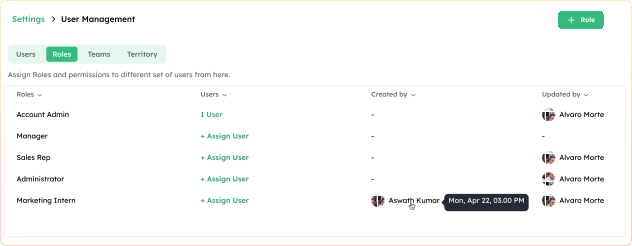
Add and manage your entire team from one place. For every user, you can assign roles and a reporting manager, set permissions, track login status, and reach out to them directly via email.
Set the rules once. Let everyone work freely.

Set the rules once. Let everyone work freely.

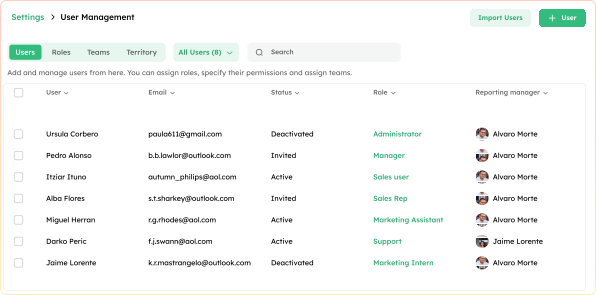
Define what each type of user can see and do across the CRM. Create custom roles like Account Admin, Manager, or Sales Representative, and assign them to the right people instantly.
Build the team. Define the structure. Win together.

Build the team. Define the structure. Win together.

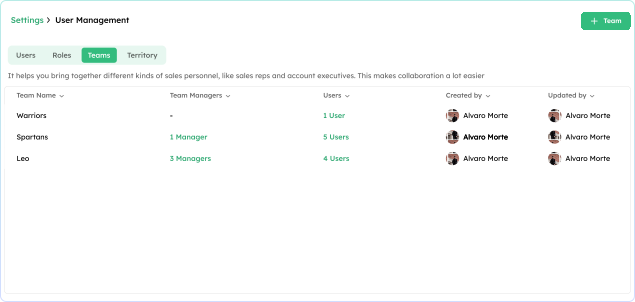
Bring together sales reps, account executives, and managers into focused groups. Teams make it easy to share views, assign territories, and keep collaboration structured.
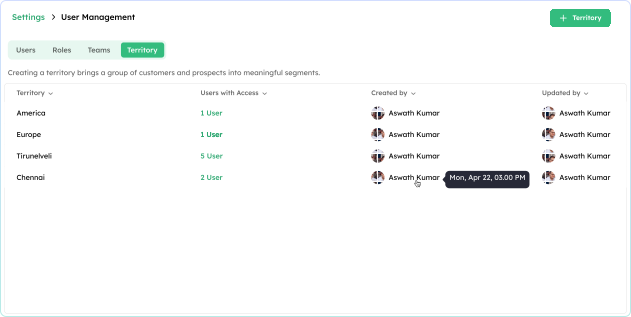
The right rep for the right region, every time.

The right rep for the right region, every time.

Segment your customers and prospects into meaningful regions or groups. Allocate leads, contacts, and opportunities to the right reps or teams, so every account has a clear owner.
Permissions built for how real teams work

Module-Level Control illustration

Module-Level Control

Decide exactly what each role can do across Contacts, Deals, Emails, Phone, Analytics, and more.

Data Visibility illustration

Data Visibility

Control what each role sees at the field level. Editable, Read Only, Hidden, or Required.

Role Ownership illustration

Role Ownership

Put the right people behind every role and track their activity with complete clarity.

Six tools. One goal: Work with a Seamless CRM

Each setting in the Account Settings section keeps your CRM aligned with how your business actually operates today and as you scale.

CRM Settings

Configure your time zone, language, and date formats at the organization level, and eliminate the inconsistencies that slow teams down.

Account

Maintain your organization’s point of contact, export your data on demand, and retain complete ownership of your account.

Plans & Billing

Know exactly what you're paying. Manage your subscription, access invoices, and keep your billing details up to date.

Currency

Your base currency anchors everything. Add more currencies and track live conversion rates regardless of market.

Tags

Create record tags and email template tags that make every record instantly identifiable.

Sales Activities

Enable the activity types that fit your workflow and disable the ones that don't — from calls and meetings to quotes and tasks.

Set it up once & Scale with confidence

Twozo’s Admin Settings are built for the admin who wants everything in place, without the enterprise complexity.